How I'm Alive Works
Two safety layers working together: active check-ins when you remember, passive signals when you don't.
The Daily Check-In
Every day at your chosen time, you get a gentle reminder. Open the app, tap the big green "I'm Okay" button, and you're done. Your emergency contact receives an instant notification: "Mum checked in at 9:03 AM."
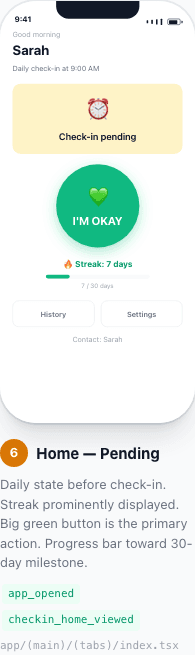
Before checking in
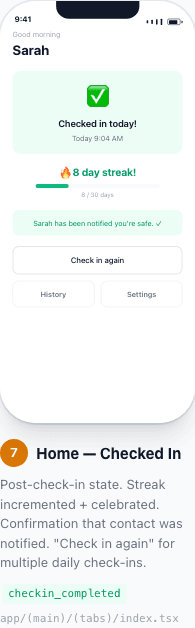
After tapping "I'm Okay"
How it works step by step:
- You set your preferred check-in time (e.g., 8:00 AM)
- A reminder notification arrives at that time each day
- You tap "I'm Okay" — takes 2 seconds
- Your emergency contact gets a notification instantly
- Optionally add a note: "Going hiking today!"
What If You Miss? The 4-Stage Alert System
If you miss your check-in, the app doesn't immediately panic. It follows a thoughtful escalation process — gentle reminders first, then alerts only when genuinely needed.
At your check-in time
Gentle push reminder to you
+30 minutes
Second reminder: "Just checking — are you okay?"
+2 hours
Alert sent to you AND your emergency contact
+6 hours
URGENT alert to your contact: "Please try to reach them"
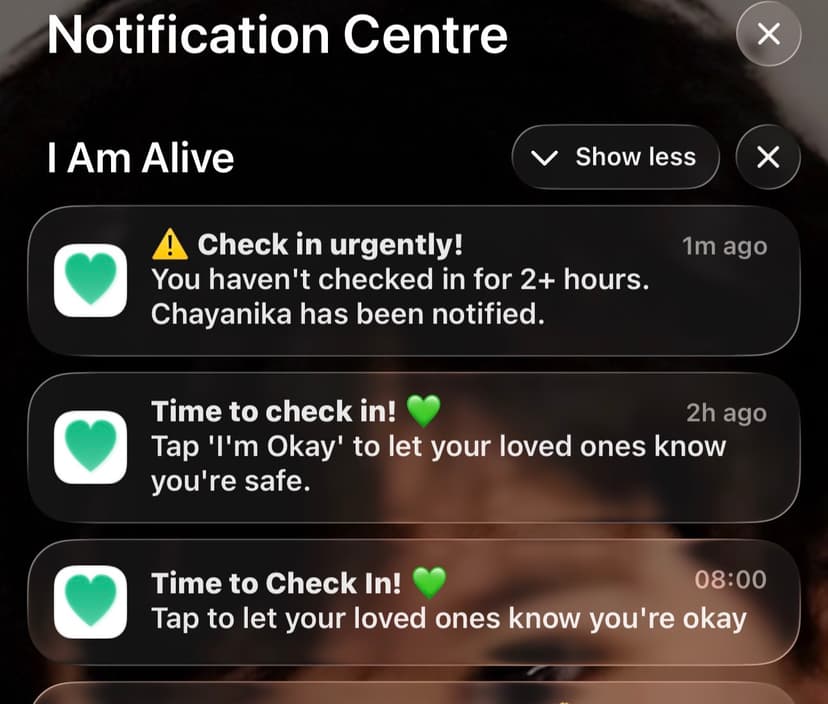
Example: escalating notifications on a contact's phone
If you check in at any point, the escalation stops immediately and your contact gets an "All Clear" message. False alarms are minimised because you get multiple reminders before anyone is alerted.
Passive Monitoring: Even If You Forget
This is what makes I'm Alive different. Most check-in apps go silent when you forget. We don't. Even if you miss your check-in, the app looks for signs you're still active — phone charging, apps being opened, device movement.
"Check-ins when they remember. Signals when they don't."
Your guardian can see "Last activity: 12 minutes ago" on their dashboard — even if you forgot to tap the button.
Privacy first
- No GPS tracking — ever
- No call or message monitoring
- No browsing history
- Only: "phone is being used" or "phone is idle"
- You can turn this off in Settings
For Guardians: What You See
If someone has added you as their emergency contact and you have a Family plan subscription, you can see their status on the Guardian Dashboard.
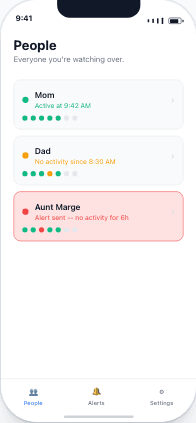
Everyone you monitor in one view
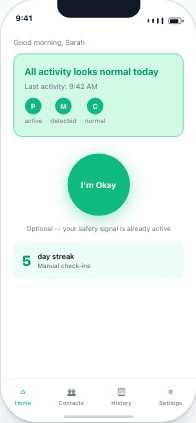
Activity signals — even without a check-in
Important: How the Dashboard Works
The Guardian Dashboard shows people who have added you as their emergency contact. You can't add people to monitor — they must add you. This protects everyone's privacy.