Key Benefits
How It Works
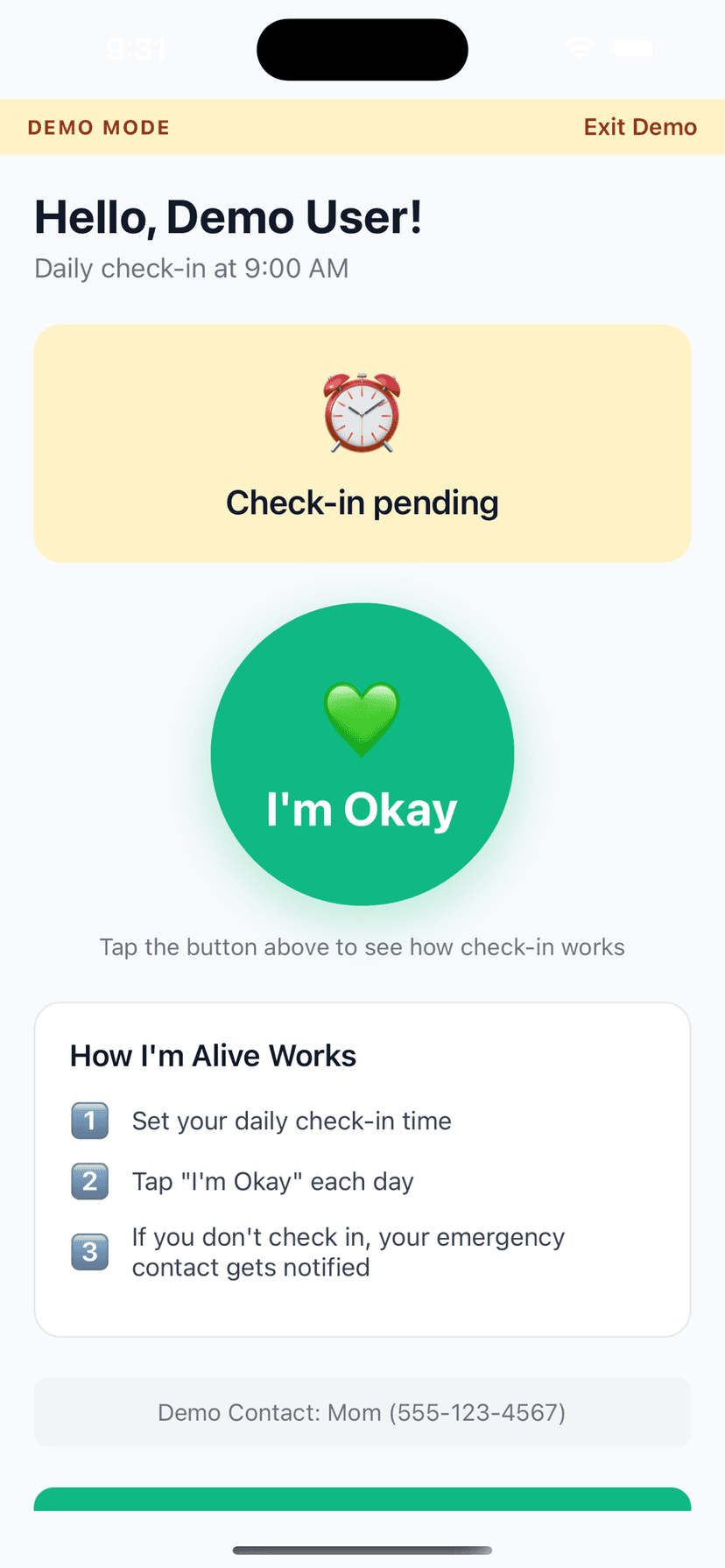
Open app. See big green 'I'm Okay' button. Tap it. That's literally all. Confirmation appears. Done for the day.
Frequently Asked Questions
How big is the button?
It takes up most of the screen. Impossible to miss, easy to tap even with limited dexterity.
What if they tap it accidentally?
No problem! An accidental check-in just confirms they're okay. There's no 'undo' needed.
My parent has arthritis. Can they use this?
The large button is designed for accessibility. A light tap anywhere on the button works.
Is there voice activation?
Not currently. But the tap is so simple that voice isn't necessary for most users.
Does the button work even if my parent has poor eyesight?
Yes. The button is designed with high contrast colors and takes up most of the screen, making it visible even for users with significantly reduced vision. The large target area means precise tapping is not required, which also helps users with motor difficulties.
← Back to Automatic Family Alerts
Take Action
Related Topics
Explore More Guides
Popular Use Cases
Compare Solutions
Browse Categories
Get Started in 2 Minutes
Download I'm Alive today and give yourself and your loved ones peace of mind. It's completely free.
Free forever • No credit card required • iOS & Android